
Manage DNS Settings
Updated 5 months ago
DNS (Domain Name System) settings control how your domain routes traffic for websites, email, and other services. Managing DNS records lets you configure advanced setups like custom email servers, subdomains, and third-party integrations.
Before you begin: DNS changes can take up to 48 hours to fully propagate worldwide, though most changes are visible within a few hours.
Access DNS settings
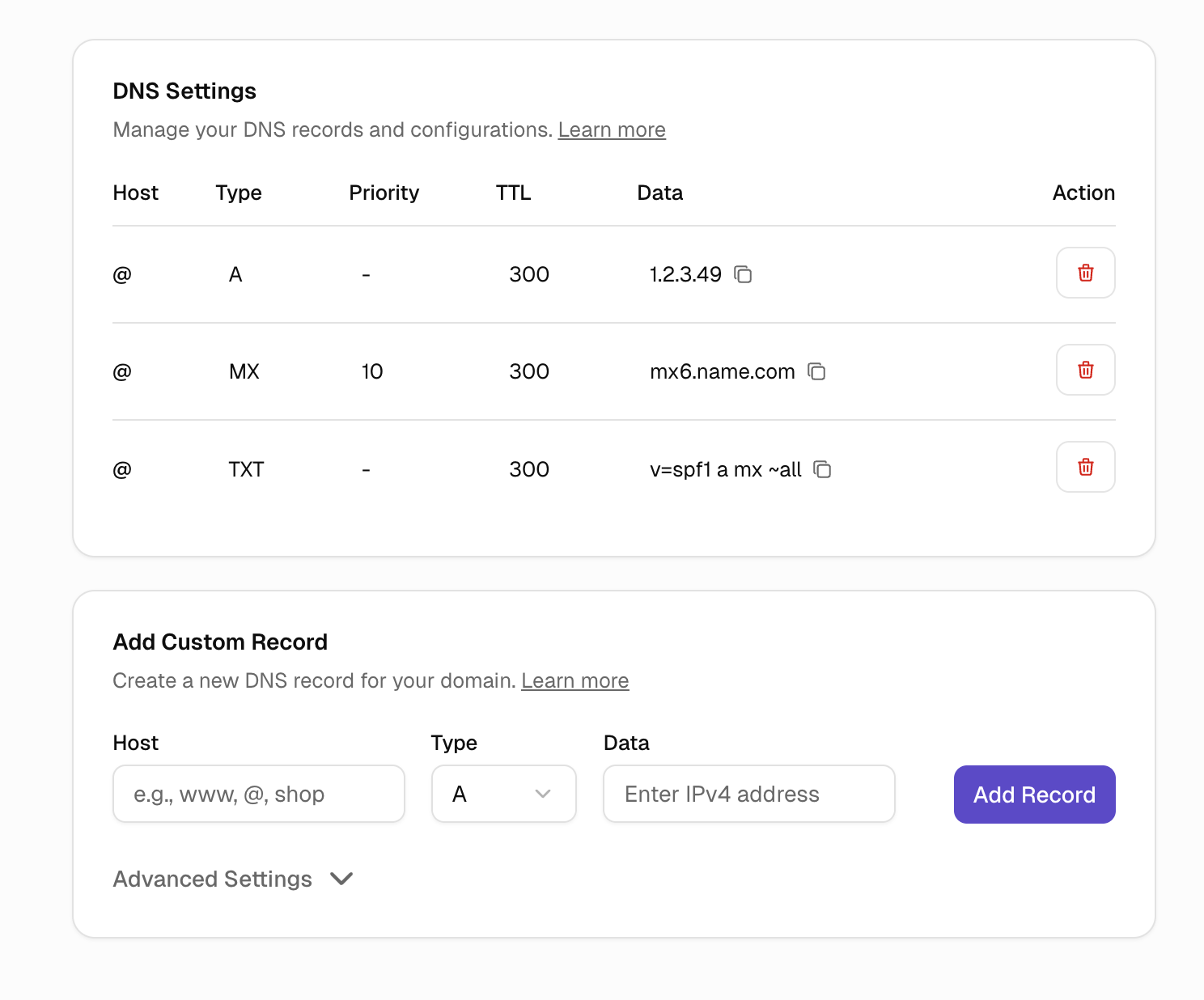
Go to the Domains tab, select your domain, and click on the DNS Settings section.
If you already have a domain, have a look at our guide on how to connect: Connect a custom domain to your Umso site
Or consider transferring your domain to Umso. Here is our Help article for that: Transfer Domain to Umso
Common DNS record types
A Record
Points your domain to an IP address. Used to connect your domain to a web server. Umso automatically configures A records for domains connected to your sites.
CNAME Record
Creates an alias that points to another domain. Commonly used for subdomains like www.yourdomain.com or blog.yourdomain.com.
MX Record
Directs email for your domain to mail servers. Required if you're using a custom email provider like Google Workspace or Microsoft 365.
TXT Record
Stores text information used for verification, security, and email authentication. Common uses include domain verification for services and SPF/DKIM records for email security.
AAAA Record
Points your domain to an IPv6 address, similar to an A record, but for newer IP format.SRV
SRV Record
Routes specific services (like SIP, XMPP, or Microsoft services) to a host and port. SRV records include priority, weight, port, and target hostname.
Add a DNS record
1. Open DNS Settings
Navigate to your domain's DNS Settings page.
2. Add new record
Click "Add Record" and select the record type.
3. Enter record details
Name/Host: The subdomain or @ for the root domain
Value/Points to: The IP address IP: 99.83.181.15, domain, or text value
TTL (Time to Live): How long the record is cached (usually 300 seconds)
4. Save
Click Save. Changes typically propagate within 1-4 hours.
Keep the default TTL (3600 seconds / 1 hour) unless you're actively making changes. A shorter TTL means faster updates but slightly slower DNS lookups.
Delete records
Find the record in your DNS settings list, and click the delete button. Be careful when deleting records—removing the wrong record can break your website or email.
Common DNS configurations
Set up custom email
Add MX records provided by your email provider (Gmail, Outlook, etc.) to use professional email addresses with your domain.
Verify domain ownership
Add a TXT record with the verification code provided by services like Google, Facebook, or email platforms.
Create subdomains
Add A or CNAME records for subdomains like blog, shop, or app.
Changing DNS records for a domain connected to an Umso site may break the connection. Only modify DNS if you know what you're doing or have been instructed by a service provider.
Related articles
Manage Nameservers - Alternative way to manage DNS
Manage DNSSEC - Add security to your DNS