
Connect Domain to Site
Updated 6 months ago
After registering or adding a domain, you need to connect it to one of your Umso websites to make it live. You can connect multiple domains to a single site or move domains between sites.
Connect a domain
1. Go to Domains
Click the "Domains" tab in your main navigation to see all your domains.
2. Select your domain
Find the domain you want to connect to and click on it to open the domain settings.
3. Choose your site
Click "Connect Site" and select which Umso website you want to connect. You can connect it to any of your existing Basic or Pro sites.
4. Set as primary (optional)
If you want this domain to be the main URL for your site, mark it as the primary domain. Visitors will be redirected to this domain from any other connected domains.
You can connect multiple domains to the same site. For example, you might connect both yourdomain.com and www.yourdomain.com.
Move a domain to a different site
If you want to use a domain with a different Umso site:
Open the editor
Open site settings -> domain settings
Click "Move Domain"
Select the destination site
Select a new primary domain for both sites
Confirm the transfer
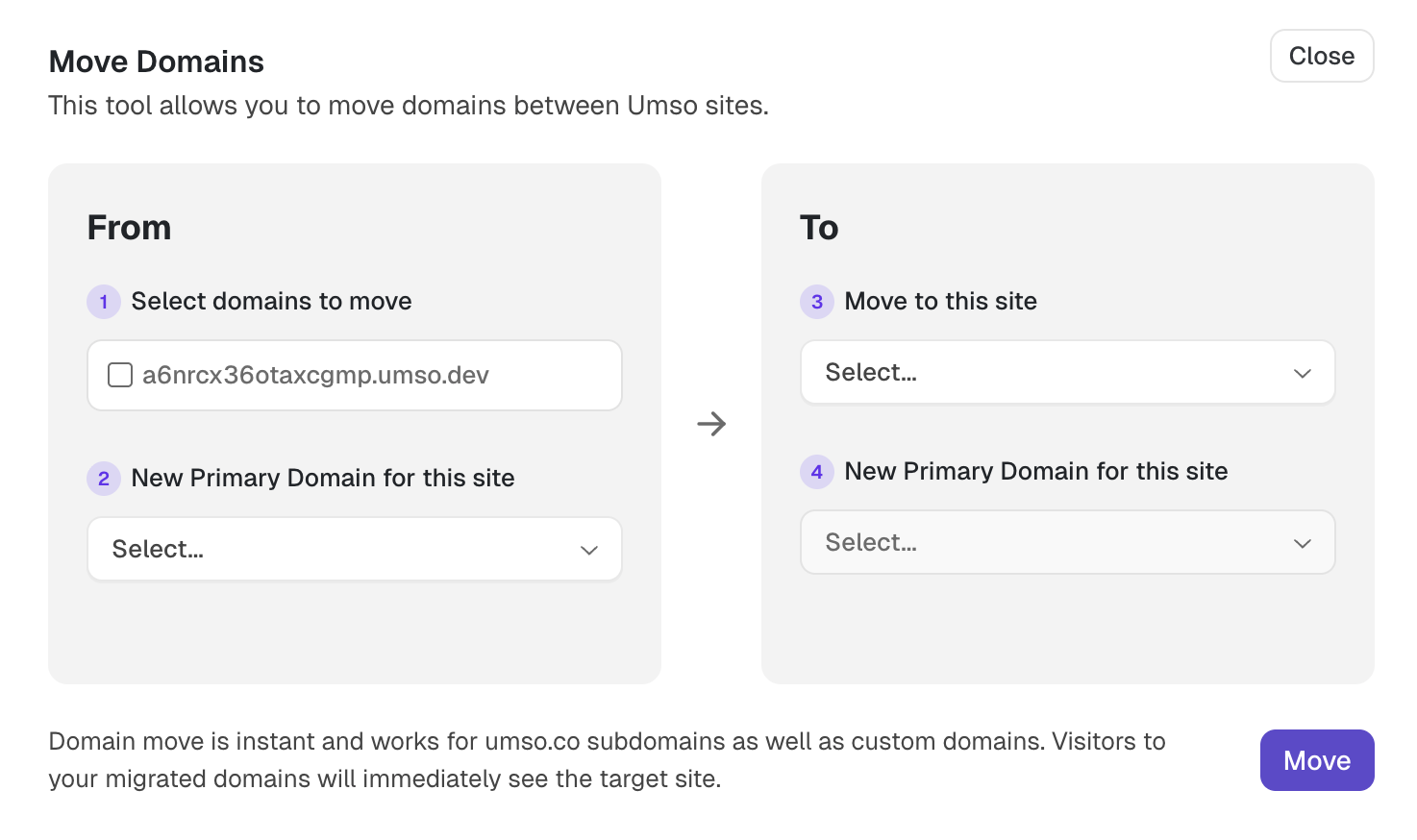
The domain will immediately start pointing to the new site.
When you transfer a domain, it disconnects from the original site. Make sure the original site has at least one other domain connected.